


On-Device Architecture: The Best Defense for Shadow AI and Shadow MCP
On-device architecture is the best way to see and control shadow AI and shadow MCP because it inspects traffic at the operating-system level, where every AI tool lives: browser tabs, desktop apps, IDE assistants, and command-line tools alike. Browser extensions see one browser. DNS filters see a domain. Cloud proxies see traffic only after a costly detour, and often miss thick clients entirely. An agent on the device sees all of it, attributes each request to the process that made it, and inspects the content locally before anything leaves. That single vantage point is why dope.security governs shadow AI and shadow MCP that other approaches never even detect.
This is a long read, because the architecture question is the whole game. If you get the layer wrong, every policy you write sits on top of a blind spot. Let's walk through why.
What are shadow AI and shadow MCP?
Shadow AI is the use of AI tools without IT or security approval, like an analyst pasting customer records into ChatGPT or a developer running proprietary code through Claude. Shadow MCP is the unsanctioned use of Model Context Protocol servers, the connectors that let AI assistants read your files, query your databases, and run tools on your behalf. One is a person sharing data prompt by prompt. The other is a configuration that moves data between an AI client and your systems automatically and repeatedly.
They are two rungs on the same ladder. For the full definitions and examples, see our explainers on what shadow AI is and what shadow MCP is. The reason to treat them together is that they share a root cause and, critically, a solution: you can only govern what you can see, and both hide in the same places legacy tools can't reach.
Why is this so hard to catch?
Because AI traffic moved. A few years ago, monitoring AI meant watching the browser. That assumption is now wrong in two directions at once.
First, the tools left the browser. AI runs from ChatGPT Desktop and Claude Desktop, from coding assistants embedded in IDEs, and from CLI tools and scripts that call model APIs directly. None of those are browser tabs. Shadow MCP in particular is almost never a browser event: a connector spins up from a local config file in a desktop client, negotiates its own encrypted session, and talks to whatever endpoint it was pointed at.
Second, the accounts went personal. Employees log in to AI tools with personal email, so there's no corporate admin console to audit and no enterprise log to check. dope.security estimates the average company uses roughly 10x more AI tools than IT approved, and in dope.security's own data, 77% of employees have pasted sensitive information into AI tools like ChatGPT. That's a large, invisible surface area colliding with human behavior that treats a chatbot like a trusted coworker.
The result: the risk is in the content of a prompt or an upload, moving from a device you manage to a service you don't, often outside the browser and always outside the corporate account. Any control that can't see that exact moment is guessing. We unpack the detection side of this in how to detect shadow AI, and why AI slipped past shadow IT programs in shadow AI vs. shadow IT.
The four places teams try to catch it, and why each misses
Most organizations already own a tool they hope will handle AI. Here's the honest read on each, measured against one question: can it see AI traffic across every app and inspect the content?
DNS and web filters
They resolve and log domains, and they can block them. What they can't do is read a prompt. A DNS filter sees that "chatgpt.com" was contacted; it has no idea whether an employee pasted a patient record or asked for a cookie recipe. It also misses desktop and CLI traffic that doesn't rely on the same resolution path. DNS filtering is fine for coarse blocking and useless for shadow AI discovery or shadow MCP.
Browser extensions
An extension sees inside exactly one browser. Deploy it in Chrome and it's blind to Edge, Safari, every desktop AI app, every IDE assistant, and every command-line tool. It's also user-removable, which makes it optional by design. For shadow MCP, where there's no browser in the loop at all, a browser extension sees nothing.
Cloud proxies (legacy SSE)
Cloud proxies can inspect content, but they do it by backhauling traffic to a vendor data center first. That adds latency to every request, ships user traffic through a third party, and routinely breaks on thick clients that pin certificates or open their own connections. Many desktop AI clients and MCP servers simply don't cooperate with a proxy in the path. So you pay the latency and privacy cost and still miss the traffic you cared about.
Endpoint DLP (traditional)
Classic endpoint DLP watches file operations, USB, and clipboard events. Useful, but it wasn't built to understand an AI prompt as a data-egress channel, and it typically leans on regex that can't catch contextual sensitivity like a paragraph describing a merger.
Line them up and the pattern is obvious: each tool sees a slice. Shadow AI and shadow MCP live in the gaps between the slices. We go deeper on this comparison in why browser extensions and cloud proxies can't see shadow AI.
What on-device architecture actually means
dope.security takes a different starting point. Instead of a proxy in a data center or an add-on in a browser, it runs a lightweight agent, dope.endpoint, directly on the device. Four properties make that decisive for AI governance:
- OS-level vantage point. The agent inspects traffic at the operating system, not inside a single application. Browser, desktop app, IDE, CLI: if it sends traffic, the agent sees it.
- Local SSL inspection. Encrypted traffic is decrypted and inspected on the device itself, so you get content visibility without shipping data anywhere.
- Process attribution. Each request is tied to the process that generated it, so you know whether it came from Chrome, ChatGPT Desktop, an IDE assistant, or a script, which is exactly the signal shadow MCP requires.
- Fly Direct, no backhauling. After inspection, traffic goes straight to its destination. There's no detour through a point of presence, so there's no latency tax and no third-party data exposure.
The agent is light, under 100 MB of RAM, and delivers roughly 4x the performance of legacy proxy-based gateways. It's the same architecture that let a Fortune 100 company scale a rollout from 900 to over 18,000 devices in a matter of weeks.
Why on-device is uniquely suited to shadow AI
Shadow AI is a coverage problem before it's a policy problem. The tools are everywhere, on every account, across browsers and native apps. On-device architecture solves coverage first.
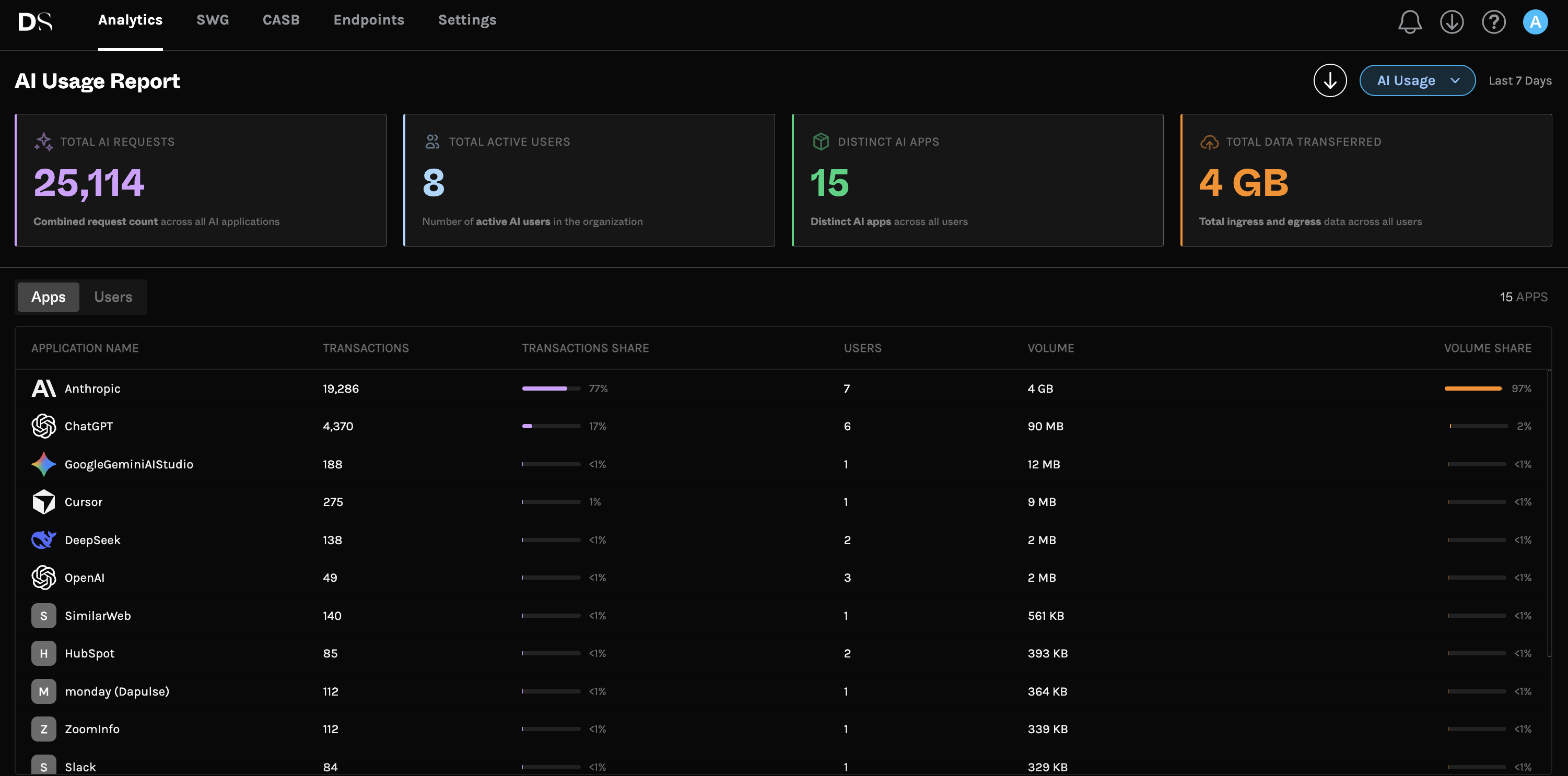
Because the agent sees at the OS level, it captures AI requests from a browser tab and from ChatGPT Desktop with equal ease, and it doesn't care whether the employee logged in with a corporate or a personal account. That's what makes real discovery possible. dope.security's AI Usage Analytics view turns that raw visibility into a dashboard: Total AI Requests, Active AI Users, and Distinct AI Apps Detected over a rolling 7-day window, with the top applications ranked by transactions and the top users by volume, plus a branded PDF export for stakeholders who don't live in the console. You can't build that picture from DNS logs, because DNS logs never saw half the traffic.
Coverage also future-proofs you. New AI tool launches next week? If it sends traffic from the device, the agent sees it, with no blocklist update required. That's the opposite of the whack-a-mole that makes blocking ChatGPT fail.
Why on-device is the only practical answer to shadow MCP
Shadow MCP is where most architectures don't just underperform, they're structurally blind. Consider how a risky MCP connection is born: a developer installs an AI coding assistant, sees it supports MCP, and adds a server that wires the assistant into an internal wiki and a production database to "speed up debugging." They paste in an API token with more scope than needed. Now an AI client has standing, automated access to sensitive systems, configured in a local file, generating encrypted traffic from a desktop process.
Walk that through the four legacy options. A browser extension: no browser, nothing to see. A DNS filter: maybe a domain, no content, no context. A cloud proxy: the thick client likely won't route through it, and if it does, you've backhauled developer traffic for the privilege. Traditional endpoint DLP: watching files, not this connector's live payload.
Now run it through on-device architecture. The agent sees the traffic because it's watching the OS, not a browser. Process attribution tells you it came from the AI client, not a person browsing. Local SSL inspection lets Dopamine DLP read what's actually moving, so sensitive data doesn't flow out through a connector nobody approved. That's the difference between governing shadow MCP and hoping it isn't happening. The full risk breakdown is in what is shadow MCP.
One architecture, three layers of control
Visibility is step one, not the finish line. The advantage of doing it on-device is that discovery, access control, and data protection all run on the same agent, on the same traffic, with no extra infrastructure. dope.security governs AI in three layers:
- Discover. AI Usage Analytics shows which AI tools are in use, how much, and by whom. Start from facts, not guesses. See how to detect shadow AI.
- Control access. Cloud Application Control restricts access to approved enterprise tenants, so employees use the corporate ChatGPT or Claude account while personal logins are blocked. Same tool, sanctioned account, real oversight.
- Protect data. Dopamine DLP inspects prompts and uploads on the device and blocks PII, PCI, PHI, and IP before they reach the model, across ChatGPT, Claude, Gemini, Perplexity, and Copilot. It classifies with a language model rather than regex, so it understands context, and it uses zero-retention APIs, so your data is never stored or used for training. dope.security holds US Patent no. 12,464,023 for the approach. More in AI DLP for ChatGPT, Claude, and Gemini.
Because it's one platform under one console, you don't stitch three vendors together to cover browsers, thick clients, and MCP. The CISO-level version of this framework, including a 90-day rollout and board metrics, is in our CISO's guide to AI governance.
The performance and privacy dividend
On-device architecture isn't only more complete. It's faster and more private, and those aren't side benefits, they're reasons the model wins.
Speed: because traffic flies direct instead of detouring through a data center, users don't pay a latency tax on every request. Legacy proxy latency runs roughly 40 to 80 ms near a point of presence and 150 to 400 ms when users are far from one. On-device inspection adds no network detour at all.
Privacy and residency: content is inspected locally, so sensitive data isn't shipped to a third party to be analyzed. For regulated teams, that's the difference between a control that helps compliance and one that creates a new exposure. It's why shadow AI in regulated sectors is as much a compliance story as a security one, covered in shadow AI in healthcare and finance.
Reach: on-device works where backhauling struggles, including regions like China where routing through distant points of presence is unreliable. Policies follow the user, not the network. The proof shows up in deployments: one healthcare provider secured 99% of its devices within a week and cut web-access IT tickets 70% in 90 days.
On-device vs. the alternatives, at a glance
- DNS filtering: domains only, no content, misses thick clients. Verdict: coarse blocking, not governance.
- Browser extension: one browser, user-removable, blind to desktop and MCP. Verdict: partial at best.
- Cloud proxy (legacy SSE): content visibility with a latency and privacy tax, breaks on pinned certificates. Verdict: incomplete and slow.
- Traditional endpoint DLP: file activity, not AI prompts, regex-bound. Verdict: wrong channel.
- On-device (dope.security): every app, content inspected locally, process-attributed, no backhaul. Verdict: sees and controls both shadow AI and shadow MCP.
If you're building an evaluation, our guide to the best shadow AI discovery tools includes the exact questions to ask a vendor.
Honest limitations and what to test in a proof of concept
No architecture is magic, and it's worth being straight about the edges. On-device inspection requires an agent on the device, so unmanaged or BYOD endpoints without the agent are out of scope until they're enrolled. Fully offline or air-gapped scenarios change the model. And DLP that understands context is powerful, but you should tune policy to your data and start in Monitor mode before you enforce.
So test it directly. In a proof of concept, try to break the coverage claim: generate AI traffic from a browser, from ChatGPT Desktop and Claude Desktop, from an IDE assistant, and from a CLI, then confirm each shows up attributed to the right process. Stand up an MCP server and check that its traffic is visible and inspectable. Paste something sensitive and confirm Dopamine DLP catches it by meaning, not just pattern. Measure the latency difference against your current proxy. The architecture should prove itself in an afternoon.
Frequently asked questions
What is the best architecture for shadow AI and shadow MCP?
On-device architecture. An agent that inspects at the operating-system level sees AI traffic across browsers, desktop apps, IDEs, and CLIs, attributes it to the process, and inspects content locally, which is the only approach that covers both shadow AI and shadow MCP.
Why can't a cloud proxy or browser extension handle shadow MCP?
Shadow MCP traffic comes from desktop clients and command-line processes, not the browser, so extensions never see it. Thick clients often refuse to route through a cloud proxy, so proxies miss it too. On-device inspection sees it because it watches the OS.
Does on-device inspection slow down devices?
No meaningful slowdown. The dope.endpoint agent uses under 100 MB of RAM and delivers about 4x the performance of legacy proxy-based gateways, and traffic flies direct with no backhaul latency.
How does on-device architecture protect privacy?
Inspection happens locally, so user traffic and prompt content are not backhauled to a third-party data center. Dopamine DLP also uses zero-retention APIs, so data is never stored or used for training.
Can dope.security cover both browser and desktop AI tools?
Yes. Because it operates at the OS level, dope.security covers browser tabs and thick clients like ChatGPT Desktop and Claude Desktop, plus IDE assistants and CLI tools.
Where should we start?
Start with discovery. Deploy the agent, turn on AI Usage Analytics, and run DLP in Monitor mode to baseline real usage, then layer in Cloud Application Control and Block mode where the risk is clear.
See and control shadow AI and shadow MCP across every AI tool. Manage AI with dope.security.
.jpg)
.jpg)
.jpeg)


