


The Best Shadow AI Discovery Tools in 2026 (and What to Look For)
.jpg)
The best shadow AI discovery tool is the one that sees AI usage where it actually happens: on the device. Most tools that claim to "discover AI" are really network filters watching domains. They undercount, they miss desktop apps, and they can't see what data went into a prompt. Here's what actually matters when you evaluate a shadow AI tool in 2026.
What should a shadow AI discovery tool do?
Strip away the marketing and a real shadow AI tool needs to answer four questions:
- Which AI applications are people using?
- How much, and who's driving it?
- What data is going into them?
- Can I act on any of it without a three-month project?
The categories of shadow AI tooling
Vendors approach this from very different starting points, and the starting point determines what they can and can't see. The main categories:
- DNS and web filters. They log domains and can block them. They can't read prompts, and they miss desktop and CLI traffic. Good for coarse blocking, weak for discovery.
- Cloud proxies (legacy SSE). They inspect traffic by backhauling it to a data center. Better content visibility than DNS, but they add latency and struggle with thick clients that pin certificates.
- Browser extensions. They see inside one browser only, and users can disable them. Blind to desktop apps and IDEs.
- CASB and SSPM. Strong for sanctioned SaaS and data at rest, but they don't watch the live prompt on the endpoint.
- Endpoint and on-device inspection. Sees AI traffic across browsers and thick clients, attributes it to a process, and can inspect content locally. The broadest vantage point for AI specifically.
For a wider comparison of the market, our AI governance software comparison and guide to AI governance tools are good companions to this post.
1. On-device visibility, not just DNS
DNS and cloud-proxy tools see a domain resolve. They miss ChatGPT Desktop, Claude Desktop, IDE assistants, and CLI tools that never touch a browser. Look for a tool that inspects on the endpoint so it captures AI traffic across browsers and thick clients, and can attribute it to the process that made the request.
2. Prompt- and file-level DLP
Discovery without content inspection is half a tool. It's not enough to know someone used an AI app. You need to know whether they pasted customer PII or uploaded a confidential file. Look for data loss prevention that reads the actual prompt and attachment, ideally with a model that understands context instead of brittle regex. If DLP is your priority, compare options in our top AI DLP tools for ChatGPT and Claude roundup.
3. Tenant-level control
Blocking an AI tool outright kills productivity and drives usage further underground. The better move is allowing your corporate account while blocking personal logins. That requires control at the tenant level, not just the domain level.
4. Fast to deploy, no backhauling
If a tool requires routing all traffic through a vendor data center, you're trading visibility for latency and a new privacy exposure. Look for an architecture that inspects locally and deploys in minutes across your fleet.
Questions to ask a shadow AI vendor
Bring these to any demo and you'll separate the real tools from the repackaged ones:
- Do you see AI traffic from desktop apps and CLIs, or only the browser?
- Can you distinguish a personal account from a corporate one?
- Do you inspect prompt and file content, or just the destination?
- Is inspection on-device, or do you backhaul traffic to a data center?
- How long does deployment take across thousands of endpoints?
- Can I export a report for non-technical stakeholders?
- What happens to my data during inspection, and is anything retained?
How dope.security approaches shadow AI
dope.security was built device-first, which is why it covers all four requirements in one platform:
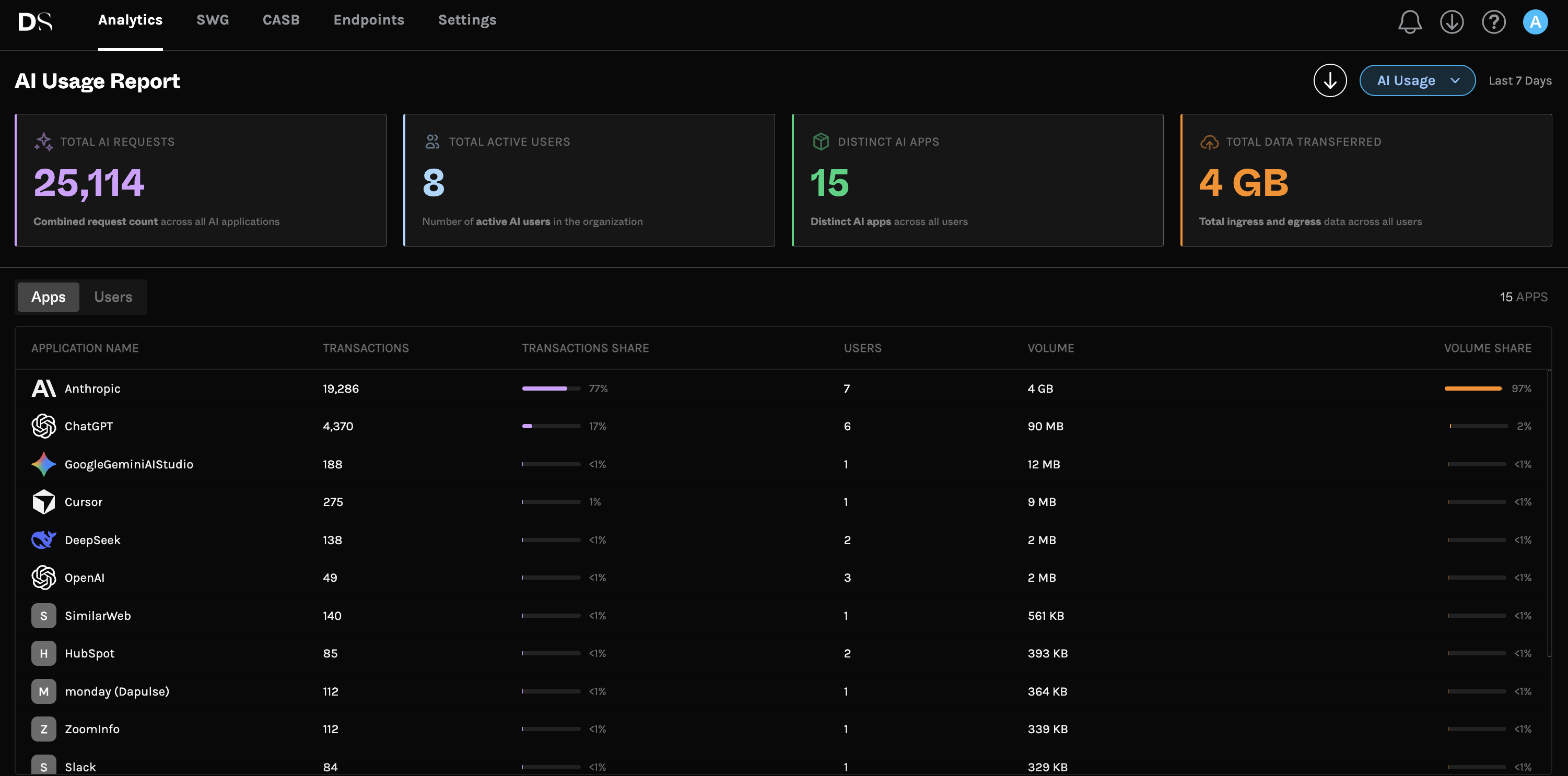
- AI Usage Analytics shows Total AI Requests, Active AI Users, and Distinct AI Apps Detected over a rolling 7-day window, with rankings of top apps and top users, plus a branded PDF export.
- Dopamine DLP inspects prompts and uploads on-device across AI tools including ChatGPT, Claude, Gemini, Perplexity, and Copilot, classifying content with an LLM rather than regex, in Block, Monitor, or Off modes.
- Cloud Application Control restricts access to approved enterprise tenants so personal accounts are blocked while corporate ones work.
- On-device architecture means SSL inspection happens on the laptop with no backhauling, and deployment takes minutes.
Answering "what data went into the prompt" is the hard part, and it's covered in depth in our best DLP for AI buyer's guide.
Shadow AI tools FAQ
What is a shadow AI discovery tool?
Software that finds and reports unsanctioned AI usage across an organization. The strongest options work at the device level and pair discovery with DLP and tenant control.
Can't I just use my existing web filter?
A web filter can block a domain, but it can't tell you what data went into a prompt or catch AI traffic from desktop apps. That's the gap purpose-built shadow AI tooling closes.
Is a browser extension enough to discover shadow AI?
No. An extension only sees one browser and can be disabled. It misses desktop apps, IDE assistants, and CLI tools entirely.
How fast can I get results?
With an on-device agent like dope.security, you can populate the AI Usage Analytics view quickly and read a rolling 7-day picture without a lengthy deployment.
Compare for yourself. Manage AI with dope.security and see your real AI usage in a rolling 7-day view.
.jpg)
.jpg)
.jpeg)


