


How to Detect Shadow AI in Your Organization (Step by Step)
.jpg)
To detect shadow AI, you need visibility at the device, where every AI request actually happens. Network logs tell you a domain was contacted. They don't tell you which AI tools your people rely on, how heavily, or who's driving the usage. Here's a practical, step-by-step way to find out.
Step 1: Accept that it's already happening
Start from the assumption that employees are using AI, because they are. dope.security estimates the average company uses around 10x more AI tools than IT approved, and most employees have shared sensitive data with a chatbot at least once. The goal isn't to catch wrongdoers. It's to get an accurate picture so you can make good policy. Framing it as discovery, not a witch hunt, gets you honest data.
Step 2: Measure at the endpoint, not the network
DNS and firewall logs undercount AI usage badly. They miss desktop apps like ChatGPT Desktop and Claude Desktop, they miss IDE assistants, and they can't distinguish a personal account from a corporate one.
dope.security measures at the device. The dope.endpoint agent inspects traffic locally, so it captures AI requests across browsers and thick clients, then feeds them into the AI Usage Analytics view in dope.console.
Step 3: Read the four numbers that matter
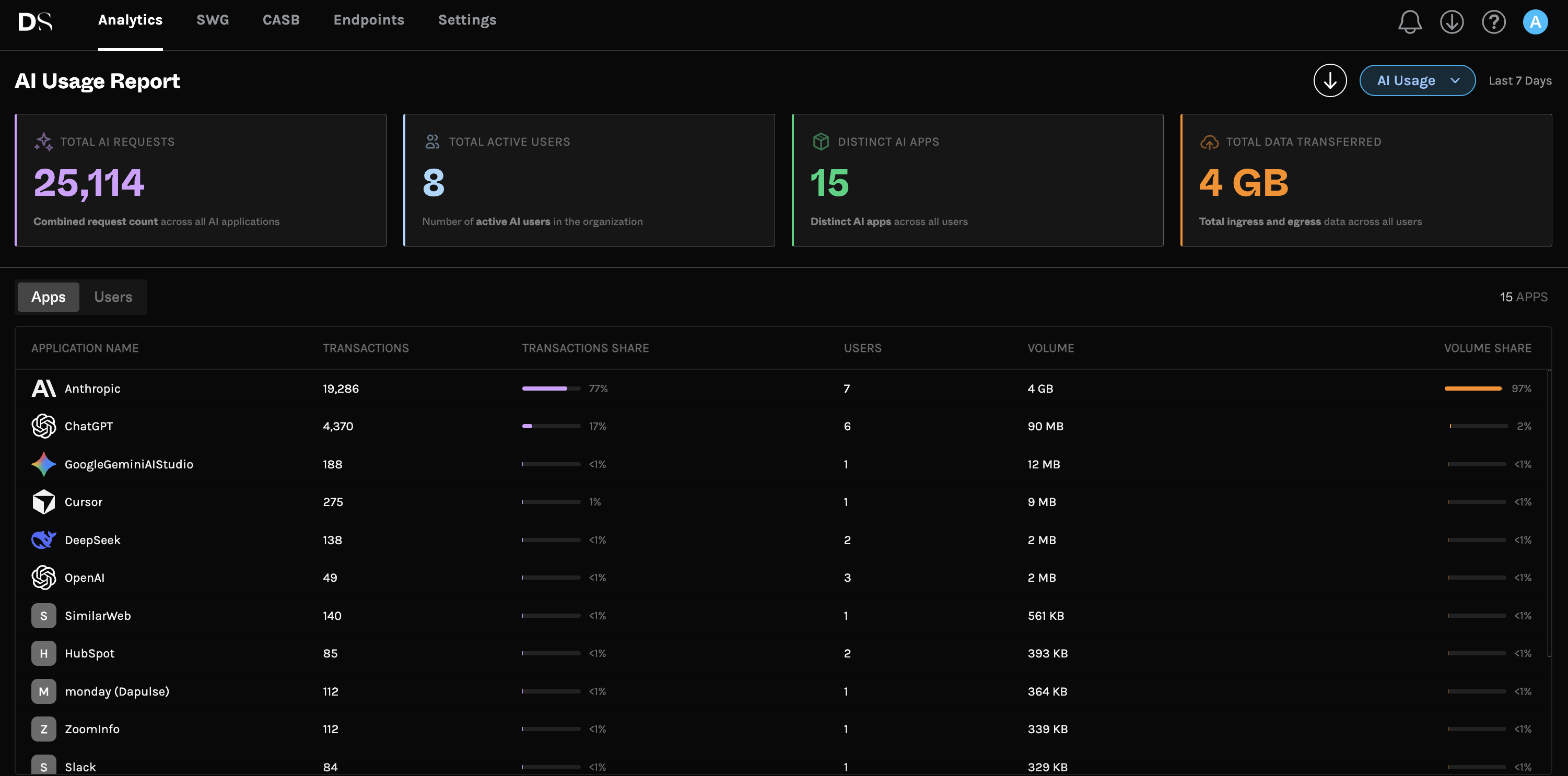
The AI Usage Analytics dashboard leads with the metrics you need for a first read on exposure:
- Total AI Requests across all AI applications.
- Active AI Users in the organization.
- Distinct AI Apps Detected across all users.
- Total Data Transferred, so you can see volume, not just hits.
All of it runs over a rolling 7-day window, so the picture stays current instead of going stale.
Step 4: Rank apps and users
Next, drill in. The view ranks the top AI applications by transactions and the top users by volume and by number of distinct apps. This is where patterns jump out: one team hammering a single tool, a handful of power users driving most of the traffic, or a long tail of niche apps you'd never have guessed.

What signals point to shadow AI?
If you're piecing it together before you have a proper tool, watch for:
- Traffic to AI domains from personal-looking sessions. Corporate SSO absent, personal accounts present.
- Desktop AI clients on managed devices. ChatGPT Desktop or Claude Desktop installed outside a sanctioned rollout.
- Spikes in outbound data to AI endpoints, which can indicate file uploads, not just chat.
- AI browser extensions requesting broad permissions.
- Expense reports for AI subscriptions IT never provisioned.
These are clues, not a system. They tell you shadow AI exists; they don't give you the who, what, and how much. For that you need continuous, device-level measurement. Our 2026 guide to AI governance tools compares the options.
A 30-day shadow AI detection plan
If you want a concrete rollout, this sequence works:
- Days 1 to 3: Deploy the dope.endpoint agent to a pilot group and confirm the AI Usage Analytics view is populating.
- Days 4 to 14: Observe in Monitor mode. Don't block anything yet. Let real usage surface.
- Days 15 to 21: Review the rankings. Identify sanctioned tools, risky tools, and personal-account usage worth converting to enterprise accounts.
- Days 22 to 30: Draft policy from the data, expand the rollout, and turn on enforcement where the risk is clear.
Notice that detection and control blend together. The moment you can see usage, the fixes become obvious. For the data-protection layer, see our buyer's guide to the best DLP for AI.
Step 5: Turn the report into a conversation
dope.security includes an on-demand, branded PDF export of the AI Usage report. Hand it to a CISO, an IT manager, or a compliance lead who doesn't live in the console. It turns "we think people use AI" into a document with numbers.
Step 6: Move from visibility to control
Detection is the start. Once you can see usage, layer on control: set secure web gateway policy to allow, warn, or block, use Cloud Application Control to permit enterprise tenants while blocking personal logins, and turn on Dopamine DLP to stop sensitive data from entering prompts and uploads in the first place. The full method is in our shadow AI discovery and governance guide.
How to detect shadow AI FAQ
What's the fastest way to detect shadow AI?
Deploy an on-device agent that reports AI usage automatically. With dope.security you can stand up the AI Usage Analytics view quickly and see real data over a rolling 7-day window.
Can I detect AI use on personal accounts?
Yes. Because dope.security inspects on the device, it sees the request regardless of which account the employee logged in with.
Can DNS or firewall logs detect shadow AI?
Only partially. They can show a domain was visited but miss desktop apps, IDE assistants, and the content of prompts, so they undercount badly.
How often should I review AI usage?
Treat it as continuous. A rolling 7-day view plus a periodic PDF export for stakeholders keeps the picture current as new tools appear.
Ready to see your numbers? Manage AI with dope.security.
.jpeg)
.jpeg)
.jpeg)


