


What Is Shadow MCP? The Next Shadow AI Problem Nobody's Watching
.jpg)
Shadow MCP is the unsanctioned use of Model Context Protocol servers, the connectors that let AI assistants read your files, hit your APIs, and run tools on your behalf. If shadow AI is employees pasting data into a chatbot, shadow MCP is employees wiring that chatbot directly into your systems. And almost nobody is watching for it yet.
MCP is the emerging standard that lets AI clients like Claude Desktop and AI-powered IDEs plug into external data sources and tools. It's powerful, which is exactly why it's about to become a governance headache.
What is MCP, in plain terms?
Model Context Protocol is a common way for an AI application to connect to "servers" that expose data or actions: a file system, a database, a ticketing system, an internal API. Instead of copy-pasting, the AI can query the source directly and take actions through it.
That's genuinely useful. It's also a new class of connection that lives on the endpoint, spins up from a config file, and often authenticates with tokens a developer pasted in themselves.
Why is shadow MCP a risk?
Shadow MCP inherits every shadow AI concern and adds a few of its own:
- Standing access, not one-off prompts. A connected MCP server can pull data repeatedly and automatically, not just when someone types a prompt.
- Broad permissions. Servers are often granted more scope than they need, so a single connector can reach far more than intended.
- Unvetted community servers. Developers install third-party MCP servers the way they grab any package. Some are fine. Some are not.
- It bypasses the browser. MCP traffic comes from desktop clients, IDEs, CLIs, and scripts, so browser extensions and DNS filters never see it.
How does shadow MCP actually happen?
It rarely looks like a security decision. It looks like a developer being productive on a Tuesday. Picture the sequence: an engineer installs an AI coding assistant, sees it supports MCP, and adds a server that connects the assistant to the company's internal wiki and a production database "just to speed up debugging." They paste in an API token with more scope than needed, because that's the token they had. Now an AI client has standing, automated read access to sensitive systems, configured in a local file, invisible to every network tool you own.
Multiply that by every developer who tries a new AI tool this quarter and you have a fast-growing web of connections nobody catalogued. This is the same pattern that made shadow AI explode, moved one layer deeper into your stack. Our generative AI security playbook covers the broader shift.
Questions to ask before approving an MCP server
You don't have to say no to MCP. You have to say yes deliberately. Before a server is approved, get answers to:
- What data and actions does it expose? Read-only file access is very different from write access to a database.
- What credentials does it use, and what's their scope? Least privilege applies here as much as anywhere.
- Who published it, and can you read the source? Community servers deserve the same scrutiny as any dependency.
- Where does its traffic go? A connector that phones home to an unknown endpoint is a red flag.
- Can you see it in use? If you can't observe the traffic, you can't govern it.
Shadow MCP vs. shadow AI
Think of them as two rungs on the same ladder. Shadow AI is a person deciding, prompt by prompt, to share data with a tool. Shadow MCP is a configuration deciding, automatically and repeatedly, to move data between a tool and your systems. Shadow AI leaks what someone types. Shadow MCP can leak what a program is allowed to reach. The controls overlap, but shadow MCP raises the stakes because the access is persistent. If you're still formalizing controls for the first rung, start with the three-layer AI governance stack.
Why can't traditional tools see shadow MCP?
Most AI governance controls assume the browser is the chokepoint. Shadow MCP breaks that assumption. The connection originates from a thick client or a command-line process, negotiates its own encrypted session, and talks to whatever endpoint the config points at.
A DNS filter sees a domain. A browser extension sees nothing, because there's no browser involved. To govern shadow MCP you need to see traffic at the layer where every process lives: the operating system.
How dope.security helps
dope.security runs an agent on the device, not a proxy in a far-off data center. Because inspection happens at the OS level with on-device SSL inspection, dope.security sees AI-related traffic across browsers and thick clients alike, then attributes it to the process that generated it.
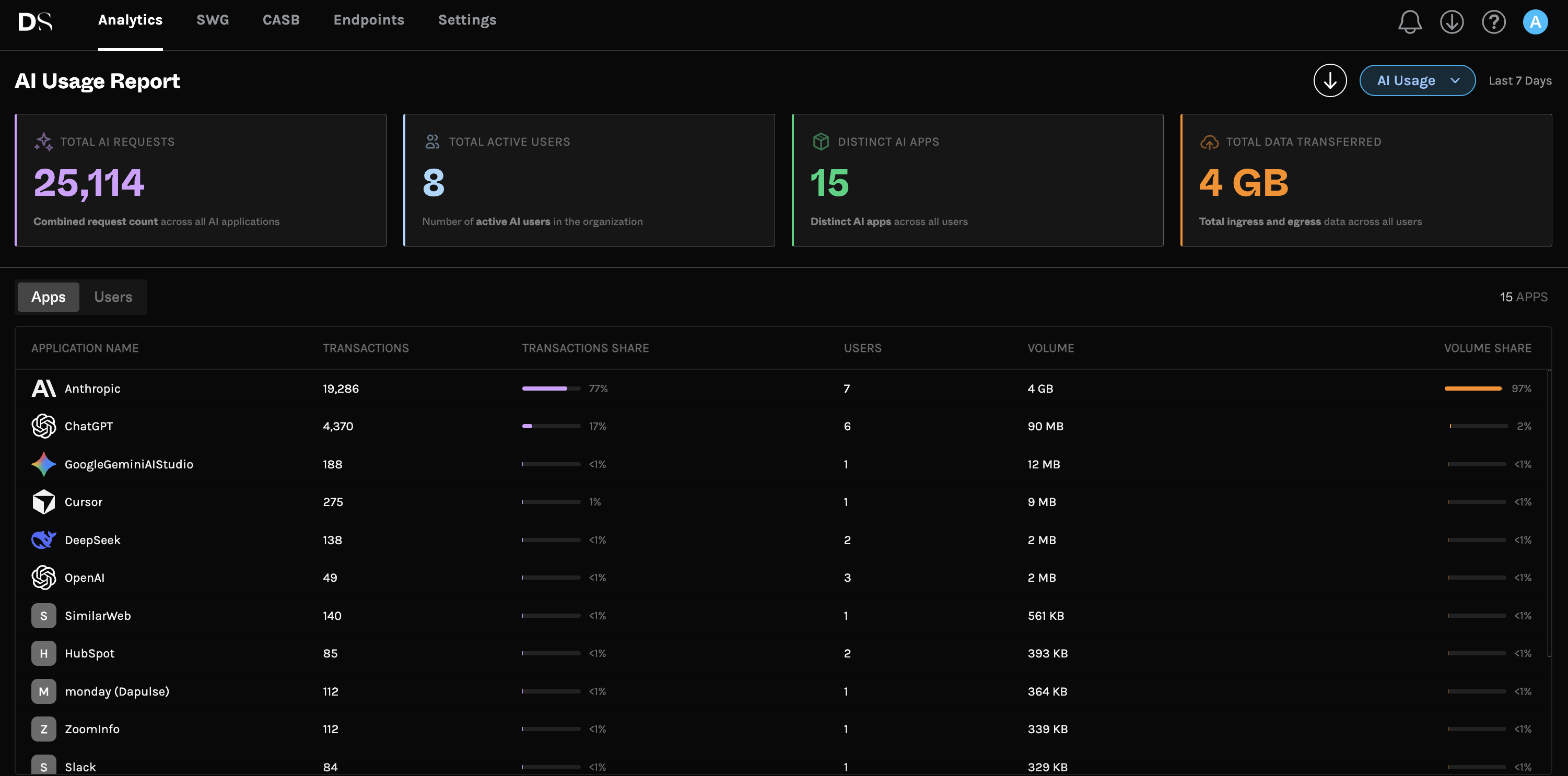
That's the foundation for governing shadow MCP the same way you govern shadow AI: the AI Usage Analytics view surfaces which AI applications and endpoints are active, the secure web gateway lets you allow or block specific destinations, and Dopamine DLP inspects what's actually moving so sensitive data doesn't flow out through a connector you didn't approve. Enforcement, not just documentation, is the point, which is the theme of our piece on AI data governance that enforces policy.
Shadow MCP FAQ
What does MCP stand for?
Model Context Protocol, an open standard for connecting AI applications to external data sources and tools.
How is shadow MCP different from shadow AI?
Shadow AI is unsanctioned use of AI tools. Shadow MCP is unsanctioned connections between those AI tools and your data or systems, which creates standing, automated access rather than one-off prompts.
How do you monitor MCP usage?
Because MCP traffic often skips the browser, you need on-device, OS-level visibility. dope.security provides exactly that through its endpoint agent.
Is MCP itself insecure?
No. MCP is a useful standard. The risk is unsanctioned, over-permissioned, or unmonitored servers, which is a governance problem, not a protocol flaw.
Should we ban MCP servers?
Banning tends to push usage underground. A better approach is an approval process plus device-level visibility so you can see and control what connects.
Get ahead of it. See how dope.security manages AI across browsers, desktop apps, and command-line tools.
.jpg)
.jpeg)


