


AI-Powered SSPM: CASB Neural Gets an Upgrade
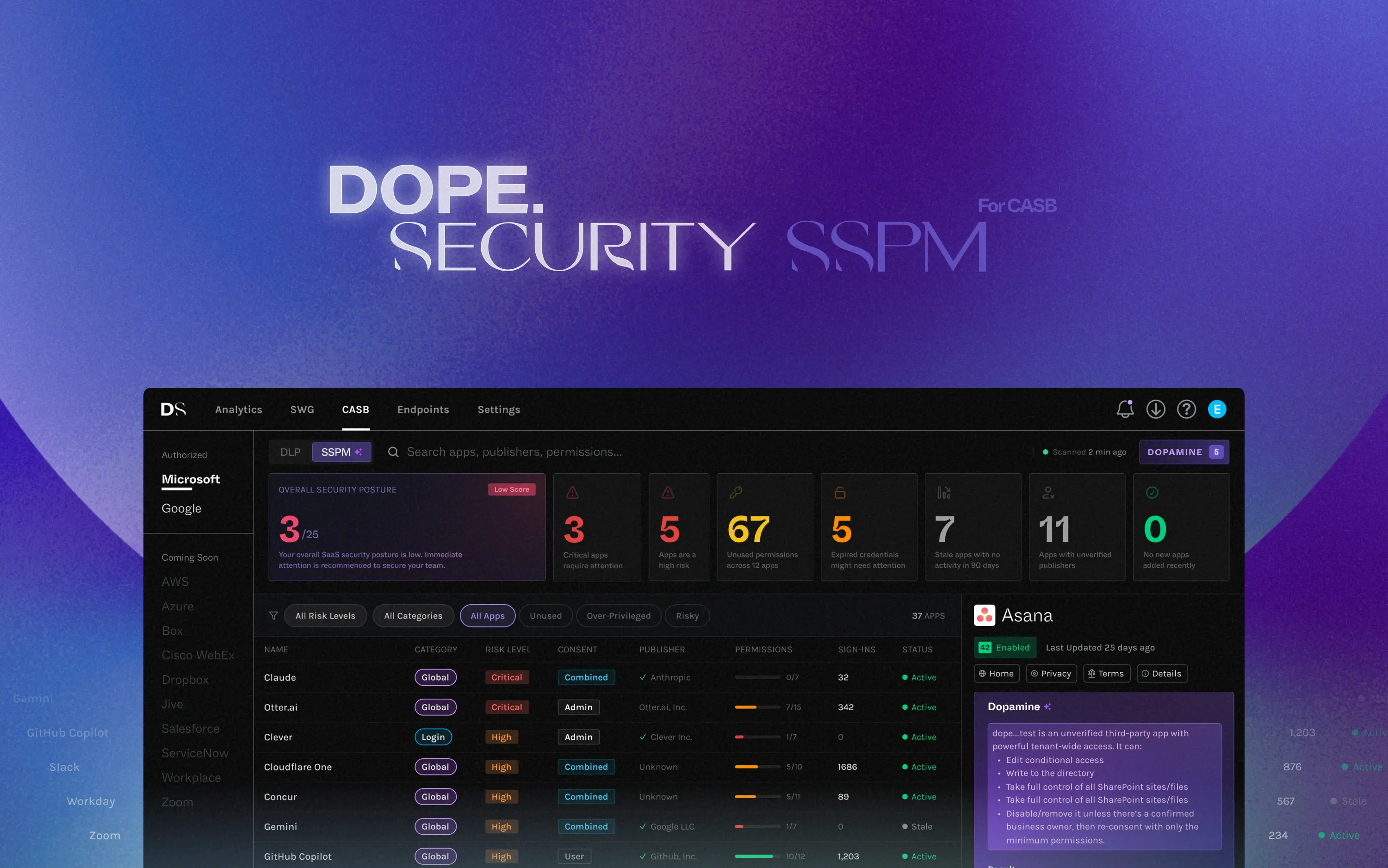
You open your SSPM dashboard and see 340 third-party apps connected to your Microsoft 365 or Google tenant. Some have read access to email. A few can write to SharePoint. One can modify Conditional Access policies: the rules that govern who gets into your entire environment.
You have two hours before your next meeting. Where do you start?
If you're using most SSPM tools on the market today, the honest answer is you guess. You look for apps you recognize, scan for anything with "admin" in the permission description, and maybe filter by install date.
This is the visibility-without-action problem. It's the core failure mode of first-generation SSPM. Our new AI-powered SSPM insights are built to fix it. Here's exactly how.
Why traditional SSPM leaves security teams stuck
The core promise of SSPM has always been visibility: show the security team every app connected to the environment, what permissions it has, and who installed it. That's genuinely useful compared to having nothing. But visibility is half the story.
OAuth scopes like files.readwrite.all and directory.read.all mean this app can read and modify every file in your OneDrive, and this app can enumerate your entire Active Directory: users, groups, roles, all of it. Surfacing those scopes and translating them into plain English so administrators understand the actual business risk is missing today. That's a huge problem when you're staring at hundreds of applications.
It gets harder from there. Even if you can read the permissions, you don't know if they're being used. An app might have read access to your entire directory and never have touched it since the day it was installed three years ago. Or it might be hitting that endpoint 200 times a day. The risk profile of those two situations is completely different. A traditional SSPM shows them identically.
Then there's the vendor question. When a third-party app shows up in your tenant, you often don't know anything about who built it: whether it's a legitimate company, whether it has a SOC 2, whether it was founded last month, whether its publisher is verified by Microsoft. That information matters enormously to how you should treat the app, and it's almost never surfaced by the SSPM.
The result: security teams end up with a list they can't actionably prioritize. They see risk, but they can't rank it. They need to remediate, but they don't know where to start or what to actually change.
How dope.security's AI-powered SSPM actually works
The goal of our AI engine is simple: take everything that's knowable about a SaaS application and turn it into something a security administrator can act on in under a minute. To do that, it pulls from four distinct sources of information.
1. Application metadata
This is the foundation: the raw OAuth data that most SSPM tools already collect. Granted permission scopes, publisher verification status, resource access scope, and application type. The AI doesn't just display these. It interprets them.
A permission like policy.read.all gets translated to:
This application can read all Conditional Access policies in your Azure AD tenant, including policies that control multi-factor authentication requirements and network access rules.
Instead of scope names that require a lookup table, administrators see what the permission actually means in practice.
2. Usage telemetry
Permissions tell you what an app can do. Telemetry tells you what it actually does. The AI analyzes real activity signals from the tenant:
- Service principal sign-in frequency and recency
- Which resources are actually being accessed
- Geographic patterns in authentication requests
- Failed authentication attempts and anomalous patterns
This context completely changes the risk calculus. An app with directory.read.all permissions that logged in once 18 months ago and hasn't been seen since is a very different risk than an app with the same permissions logging in from three different countries every night. Without telemetry, both look identical. With it, the difference is clear.
3. Vendor and company research
Who actually built this app? The AI performs external research on the vendor behind every application:
- Company identity, website, and business category
- Organization size and funding profile (one-person shop or publicly traded company?)
- Security certifications, including SOC 2 compliance
- Publisher verification status with Microsoft
- Reputation signals and business legitimacy indicators
This is context security teams previously had to look up manually, if they had time to look it up at all. Now it's surfaced automatically for every connected application.
4. Tenant-level intelligence
The fourth input comes from the tenant itself. The AI looks at:
- Tenant ID and domain resolution (is the app registered to the expected tenant?)
- Application ownership signals (does this app have an assigned owner inside the organization?)
- Cross-app permission analysis (how does this app's access compare to others in its category?)
Applications without documented owners are a common governance gap. No one knows who's responsible for reviewing, updating, or removing them. The AI surfaces these gaps explicitly.
What the AI actually generates
Once the engine has analyzed an application across all four input sources, it produces a structured insight package.
Plain-language application summary
A concise paragraph explaining what the application does, why it exists in the environment, and how it interacts with the tenant. Not OAuth scope names. Not app IDs. An actual description a non-technical stakeholder could read and understand.
This matters more than it sounds. Many applications in enterprise tenants are orphaned. The employee who installed them has left, the original business use case is forgotten, and no one knows what the app does or whether it's still needed. A plain-language summary gives administrators the context to make that call quickly.
Multi-signal risk scoring
Rather than a single number derived from permission scope alone, the AI produces a composite risk score across five dimensions:
- Permission risk: How powerful are the granted OAuth scopes? An app that can read calendar events is fundamentally different from one that can write to all SharePoint sites or read the entire directory.
- Telemetry signals: Are those permissions actively exercised? An unused permission is a different kind of risk than an overused one. Both matter, but differently.
- Publisher verification: Is the vendor verified by Microsoft or Google? Unverified publishers are a significant risk signal because they've made no commitments to Microsoft's security standards.
- Category fit: Do the permissions match what the app claims to do? A calendar scheduling tool that also has permission to read all mail is a red flag. A mismatch between stated purpose and actual permissions often indicates over-provisioning or, in the worst case, malicious intent.
- Company reputation: What's the trust profile of the vendor? A bootstrapped startup with no security certifications handling sensitive data access is a different risk than a publicly listed enterprise software company.
These five dimensions combine into a final risk score that reflects actual exposure rather than worst-case theoretical access. An app with powerful permissions and a verified publisher that's actively used and properly owned will score very differently than an abandoned app with the same permissions and no accountability structure.
Key risk findings, spelled out
Rather than surfacing everything and making administrators sort through it, the AI highlights only the most significant security signals for each application:
- Excessive privileges relative to the app's stated function (a note-taking app with mail read access)
- Unused permissions that have never been exercised but remain active
- High-risk scopes like directory or Conditional Access policy control
- No assigned application owner inside the organization
- Signs of over-provisioning where similar apps in the same category have far narrower permissions
Specific recommended actions
Two prioritized remediation actions show up in the UI for every application, ready to act on immediately. They're specific, not generic. Instead of "review app permissions," the platform tells you: revoke files.readwrite.all and replace it with files.read, or disable service principal sign-in for this application pending review, or remove the app entirely because it has had no active sessions in 14 months.
The Dopamine insight: one sentence that matters most
Every analysis closes with a Dopamine insight: a single, high-impact summary of the most critical thing to know about that application. No interpretation required. It's designed for the moment when you're scanning 50 applications and need to know which one actually deserves your attention right now.
This application can modify Conditional Access policies and control SharePoint data across the tenant. Reduce permissions to the minimum required and assign owners to maintain oversight.
Beyond individual apps
Individual application analysis is necessary but not sufficient. The AI engine also looks across your entire SaaS environment to identify patterns that only become visible at scale.
Permission debt
Permission debt is the accumulated total of permissions that have been granted across your SaaS environment but are never exercised. In most enterprise tenants, it's enormous. It's a natural byproduct of how SaaS apps are installed: users accept whatever permissions an app requests at install time because declining means the app won't work, and then those permissions sit unused indefinitely.
The AI quantifies your permission debt across the full tenant: how many permissions, how powerful they are, and which apps are carrying the most unused access. This is exactly the kind of systemic risk insight that no amount of manual app-by-app review would surface.
Stale and abandoned applications
Apps accumulate. Teams try a new tool, run a proof of concept, or install something for a one-time project, and then move on without cleaning up the OAuth grant. The app keeps sitting in the tenant, potentially with significant permissions and no active governance.
The AI identifies stale applications using combined signals: time since last sign-in, last known activity, and permission scope. An app with admin-level directory access that hasn't signed in for six months is not a low-priority finding. It's an unguarded door.
High-value attacker targets
Not all apps are equal from an attacker's perspective. Some, if compromised, would give an attacker extraordinary leverage: the ability to read all email, modify authentication policies, or enumerate every user in the directory. The AI specifically identifies these high-value targets and calls them out directly, because these are the applications that warrant tighter controls, more frequent review, and active monitoring regardless of their current risk score.
Quick wins and strategic improvements
The tenant-wide analysis closes with two prioritized categories of action. Quick wins are changes you can make today (typically revoking unused permissions on a handful of applications or disabling a few stale integrations) that will meaningfully reduce your overall risk posture in under an hour. Strategic improvements are the longer-term governance changes: building an ownership and review process for new app installations, establishing permission scope policies, setting up automated alerts for high-risk OAuth grants.
The bigger picture: SSPM should make decisions easier, not harder
First-generation SSPM was built around an assumption that turned out to be wrong: that if you just gave security teams enough data, they'd know what to do with it. That assumption was wrong in 2020 and it's increasingly wrong today, as the average Microsoft 365 or Google tenant runs hundreds of third-party integrations and security teams haven't grown proportionally.
The right model isn't more data. It's better intelligence. An AI engine that combines telemetry, vendor research, and tenant analysis to produce something actionable: not just a number, but a clear explanation of why something is risky and a specific list of what to do about it.
That's the shift: from visibility to intelligence to action. And it's what we've built.
See it in your own tenant
Book a 20-minute demo and we'll walk through AI-powered SSPM insights using real examples from a Microsoft 365 or Google environment.
.jpeg)
.jpeg)


